How to retain 90% of everything you learn


proof
Imagine if you had a bucket of water. And every time you attempted to fill the bucket, 90% of the water would leak out instantly. Every time, all you’d retain was a measly 10%. How many times would you keep filling the bucket?
The answer is simple: just once.
The first time you noticed the leak, you’d take action
You’d either fix the bucket or you’d get another bucket, wouldn’t you?
Yet that’s not at all the way we learn.
Almost all of us waste 90% of our time, resources and learning time, because we don’t understand a simple concept called the Learning Pyramid. The Learning Pyramid was developed way back in the 1960s by the NTL Institute in Bethel, Maine. And if you look at the pyramid you’ll see something really weird.
That weird thing is that you’re wasting time. You’re wasting resources. You’re just doing everything you can to prevent learning. And here’s why.
To summarize the numbers (which sometimes get cited differently) learners retain approximately:
90% of what they learn when they teach someone else/use immediately.
75% of what they learn when they practice what they learned.
50% of what they learn when engaged in a group discussion.
30% of what they learn when they see a demonstration.
20% of what they learn from audio-visual.
10% of what they learn when they’ve learned from reading.
5% of what they learn when they’ve learned from lecture.
So why do you retain 90% when you teach someone else or when you implement it immediately?
There’s a good reason why. When you implement or teach, you instantly make mistakes. Try it for yourself. (In this article for instance, after I’d read the information, I cited the loss rate as 95% instead of 90% to begin with. I had to go back and correct myself. Then I found three more errors, which I had to fix. These were factual errors that required copy and paste, but I still made the errors).
So as soon as you run into difficulty and start to make mistakes, you have to learn how to correct the mistake. This forces your brain to concentrate.
But surely your brain is concentrating in a lecture or while reading
Sure it is, but it’s not making any mistakes. What your brain hears or sees is simply an abstract concept. And no matter how clearly the steps are outlined, there is no way you’re going to retain the information. There are two reasons why.
Reason 1: Your brain gets stuck at the first obstacle.
Reason 2: Your brain needs to make the mistake first hand.
Reason 1: Your brain gets stuck at the first obstacle.
Yes it does. And the only way to understand this concept is to pick up a book, watch a video, or listen to audio. Any book, any video, any audio. And you’ll find you’ve missed out at least two or three concepts in just the first few minutes. It’s hard to believe at first, but as you keep reading the same chapter over and over, you’ll find you’re finding more and more that you’ve missed.
This is because the brain gets stuck at the first new concept/obstacle. It stops and tries to apply the concept but struggles to do so. But you continue to read the book, watch the video or listen to the speaker. The brain got stuck at the first point, but more points keep coming. And of course, without complete information, you have ‘incomplete information’.
Incomplete information can easily be fixed by making the mistake first hand.
Reason 2: Your brain needs to make the mistake first hand
No matter how good the explanation, you will not get it right the first time. You must make the mistake. And this is because your interpretation varies from the writer/speaker. You think you’ve heard or read what you’ve heard/read. But the reality is different. You’ve only interpreted what they’ve said, and more often than not, the interpretation is not quite correct. You can only find out how much off the mark you are by trying to implement or teach the concept.
So how do you avoid losing 90% of what you’ve learned?
Well, do what I do. I learn something. I write it down in a mindmap. I talk to my wife or clients about the concept. I write an article about it. I do an audio. And so it goes. A simple concept is never just learned. It needs to be discussed, talked, written, felt etc. (I wrote this article, ten minutes after reading these statistics online).
The next time you pick up a book or watch a video, remember this .
Listening or reading something is just listening or reading.
It’s not real learning.
Real learning comes from making mistakes.
And mistakes come from implementation.
And that’s how you retain 90% of everything you learn.
Which is why most of the people you meet are always going around in circles.
They refuse to make mistakes. So they don’t learn.
They’d rather read a book instead. Or watch a video. Or listen to an audio.
Their bucket is leaking 90% of the time.
But they don’t care.
The question is: Do you?
————————————————————————————————————————

 

How FB account Get Hacked Via Creating Phishing Page


What is Phishing?

Phishing is the act of tricking someone into signing onto a fake website, which mimics a real site, such as Facebook. The phishing page will log the credentials that the user enters in the password field, and usually goes unnoticed with the right circumstances and some Social Engineering.
The phishing page is created by visiting the website you want to mock, copying the source HTML code, and then altering it to use a custom PHP script to log the victim's credentials. A good phishing page will seamlessly use cookies to bypass redirect filters. So if a cookie for the site exists, the user will be logged in and more than likely won't realize what happened.

Warnings

  • Phishing is illegal.
  • Only phish your friends who give you consent to do so.

Step 1 Get a Web Host

You need a place to host your phishing page. I like T35—they are free, and offer cPanel hosting.
  1. Make a free account on T35.
  2. Go to your email that you used and click the link confirming the account.

Step 2 Create the Phishing Page

Now we need to create the site that will log the victim's credentials.
  1. Open up a text document using notepad, or your choice in text editors.
  2. Go to the Facebook login page.
  3. Right-click somewhere on the page, and click View page source.
  4. Copy all of the contents of the source code and paste them into your text document.
  5. Hit ctrl + f, and search for "action=" and change the method to "GET", and the text to the right of"action=" to "log.php".
  6. Click File > Save as and save it with the name "index.php" (make sure to click the drop-down menu to select "all files" if it's not selected already).
  7. Make a new text file, and paste this as the contents (paste the raw text, not the numbered). This is the file written in PHP that logs the victim's login details.
  8. Save the file as "log.php". Again, make sure "all files" is selected in the file type drop-down menu.
  9. Log in to your T35 account and click Upload. Upload both files to the root of your website (not in a folder).
  10. When credentials are logged, they will be in a file called "passwords.txt" in the root of your website. Check the box next to the "passwords.txt" file when you get some logs, and click chmod. Change the file to 466 permissions, so other people can't read the victim's passwords.

Step 3 Perform the Phish

In a status update on Facebook, post something like the following:
    "Check out this funny picture of me on my website xD <post link to phishing page here>."
It's really that simple. You should start to see people's login credentials getting stored in your "passwords.txt" file. Simply because it comes from a "trusted" Facebook friend, they will go with their instincts and click the link without thinking twice about it. The best part about that PHP code posted above, is the header sends you back to the Facebook homepage, bypassing the redirect filter warning that Facebook has implemented, which will make it nearly seamless to the user who fell for it.
 

How to Get Back Your Hacked Facebook Account

If your facebook account was hacked by someone and you really want it back this tutorial would help you get it back.

Step 1:

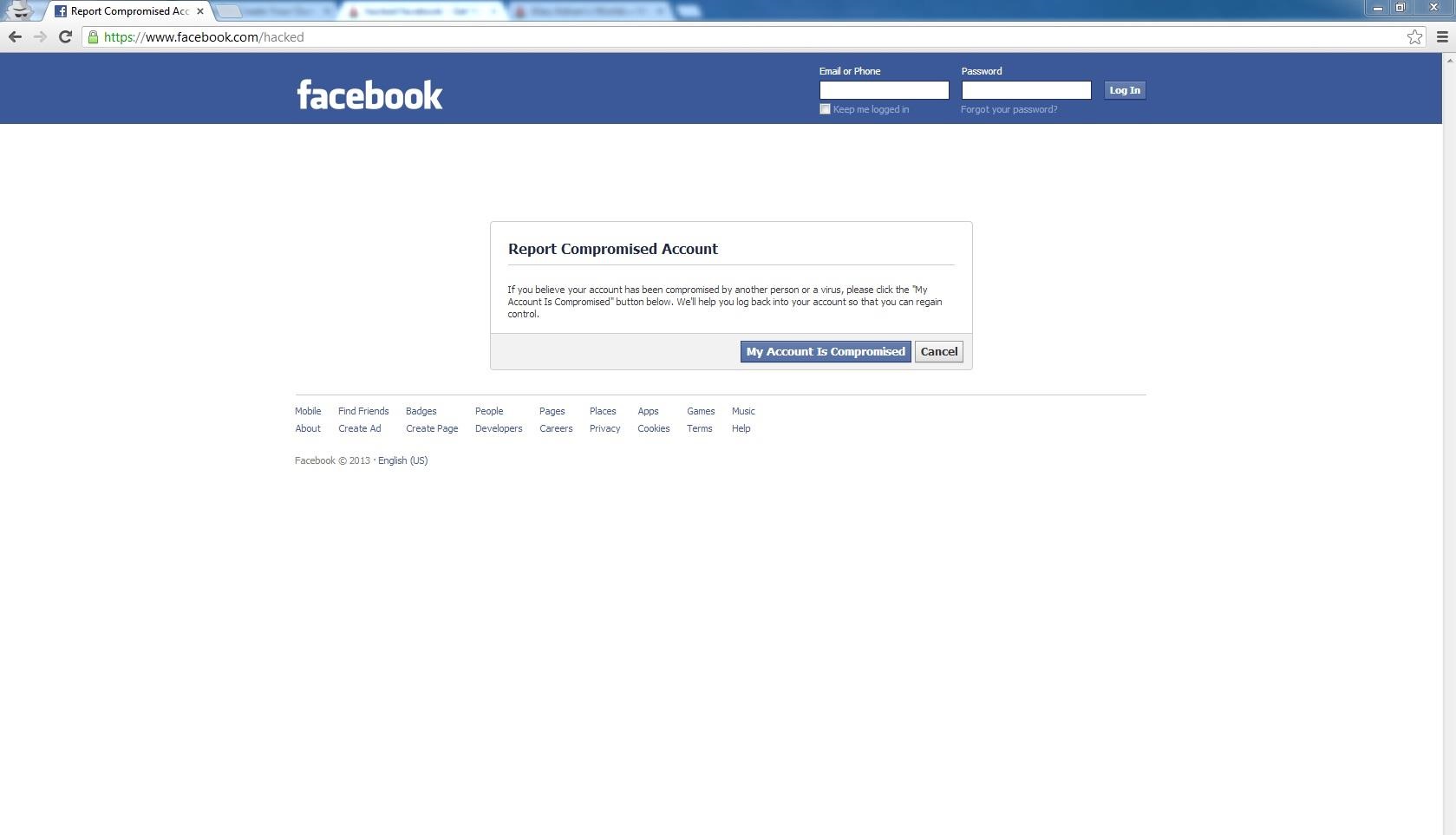
First goto this link. https://www.facebook.com/hacked
Click the button "Your account has been Compromised".
Then type in your email address, Login name , Full Name or your specified Phone No.
Then facebook would search for matching users. If you still don't see your account, try entering something else other than the one you entered.
( for example if you entered your phone number and it didn't work try entering your email or Login name.) Most of the time using your email would be the wisest choice.)
And hit Search. :)

Step 2:

Well now the kind of difficult part begins. But I don't think it would be for you.
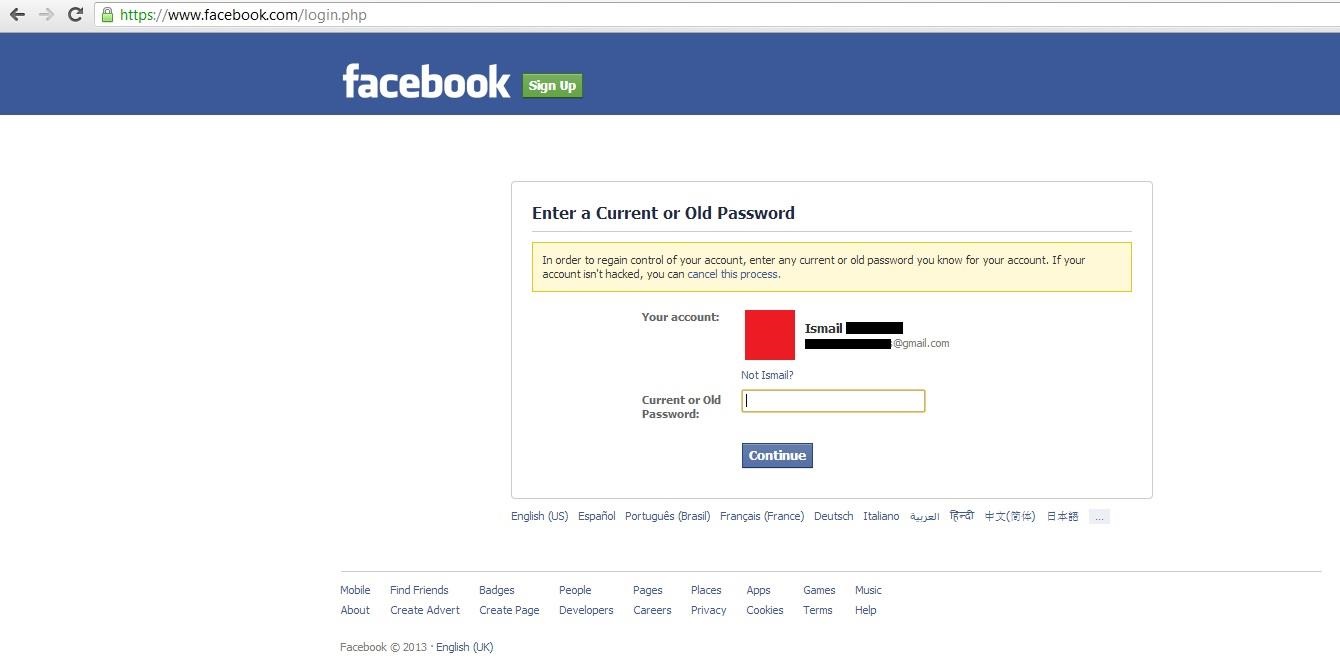
Now for this step you got to enter your account's password. Well if you knew the password you won't be here anyway, cause you don't know your new password the Hacker's changed, enter your old password. The password that you use, to enter into your account before you got HACKED :<

Step 3:

Then cause you entered an old actually now wrong password this page will come up.
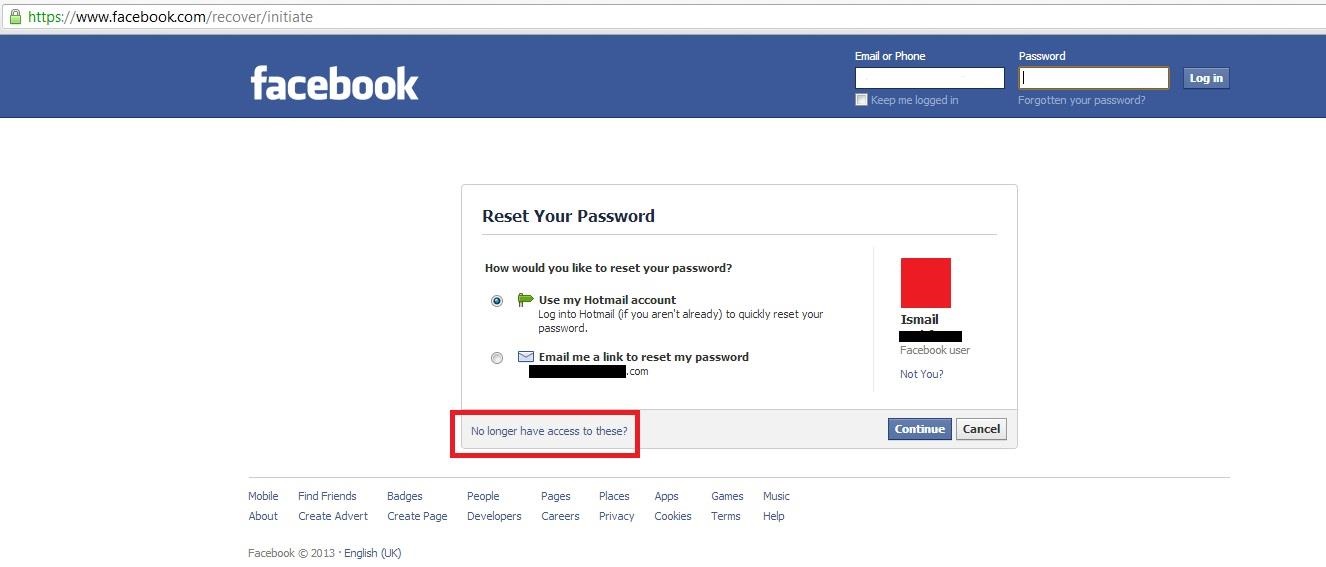
Well no need to be down yet. Just click the reset my password button.

Step 4:

Your primary email would be changed so well of course you don't want to send your reset your password link to the hacker's account so, Click "no longer have access to these?" link.

Step 5:

Well now you almost got your account back.
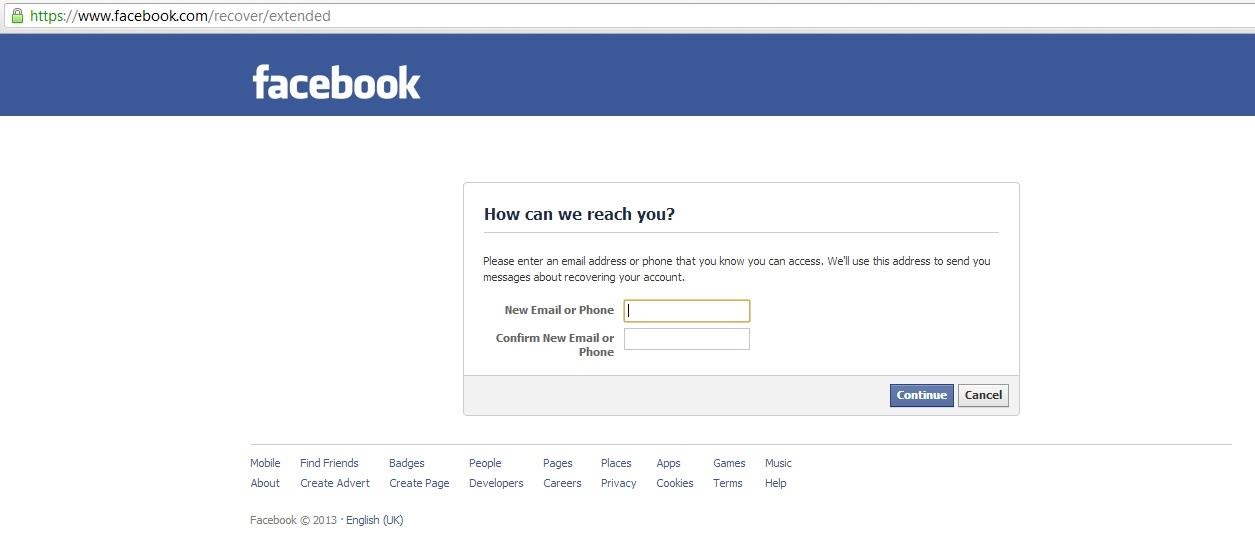
Now write your new email address that you want to send the change password link as well set as your primary email.

Step 6:

Well now, follow the next steps and you would have your account back in 24 hours. XD
 

Four Ways How Facebook Acount Get Hacked And How to Protect Urself from beeing Hacked

We share our lives on Facebook. We share our birthdays and our anniversaries. We share our vacation plans and locations. We share the births of our sons and the deaths of our fathers. We share our most cherished moments and our most painful thoughts. We divulge every aspect of our lives. We even clamor to see the latest versions even before they're ready for primetime.
But we sometimes forget who's watching.
We use Facebook as a tool to connect, but there are those people who use that connectivity for malicious purposes. We reveal what others can use against us. They know when we're not home and for how long we're gone. They know the answers to our security questions. People can practically steal our identities—and that's just with the visible information we purposely give away through our public Facebook profile.


The scariest part is that as we get more comfortable with advances in technology, we actually become more susceptible to hacking. As if we haven't already done enough to aid hackers in their quest for our data by sharing publicly, those in the know can get into our emails and Facebook accounts to steal every other part of our lives that we intended to keep away from prying eyes.
In fact, you don't even have to be a professional hacker to get into someone's Facebook account.
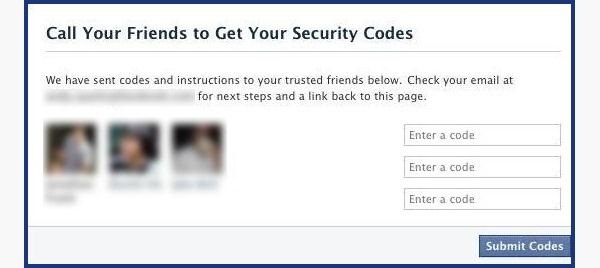
It can be as easy as running Firesheep on your computer for a few minutes. In fact, Facebook actually allows people to get into someone else's Facebook account without knowing their password. All you have to do is choose three friends to send a code to. You type in the three codes, and voilĂ —you're into the account. It's as easy as that.
In this article I'll show you these, and a couple other ways that hackers (and even regular folks) can hack into someone's Facebook account. But don't worry, I'll also show you how to prevent it from happening to you.


Method 1: Reset the Password

The easiest way to "hack" into someone's Facebook is through resetting the password. This could be easier done by people who are friends with the person they're trying to hack.
  • The first step would be to get your friend's Facebook email login. If you don't already know it, try looking on their Facebook page in the Contact Info section.
  • Next, click on Forgotten your password? and type in the victim's email. Their account should come up. Click This is my account.
  • It will ask if you would like to reset the password via the victim's emails. This doesn't help, so press No longer have access to these?
  • It will now ask How can we reach you? Type in an email that you have that also isn't linked to any other Facebook account.
  • It will now ask you a question. If you're close friends with the victim, that's great. If you don't know too much about them, make an educated guess. If you figure it out, you can change the password. Now you have to wait 24 hours to login to their account.
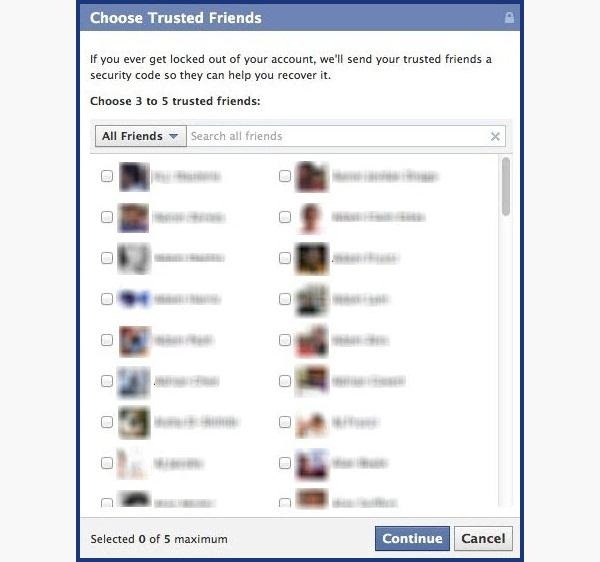
  • If you don't figure out the question, you can click on Recover your account with help from friends. This allows you to choose between three and five friends.
  • It will send them passwords, which you may ask them for, and then type into the next page. You can either create three to five fake Facebook accounts and add your friend (especially if they just add anyone), or you can choose three to five close friends of yours that would be willing to give you the password.


How to Protect Yourself

  • Use an email address specifically for your Facebook and don't put that email address on your profile.
  • When choosing a security question and answer, make it difficult. Make it so that no one can figure it out by simply going through your Facebook. No pet names, no anniversaries—not even third grade teacher's names. It's as easy as looking through a yearbook.
  • Learn about recovering your account from friends. You can select the three friends you want the password sent to. That way you can protect yourself from a friend and other mutual friends ganging up on you to get into your account.

Method 2: Use a Keylogger

Software Keylogger
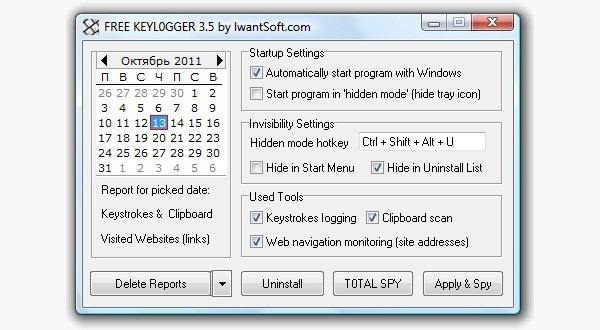
A software keylogger is a program that can record each stroke on the keyboard that the user makes, most often without their knowledge. The software has to be downloaded manually on the victim's computer. It will automatically start capturing keystrokes as soon as the computer is turned on and remain undetected in the background. The software can be programmed to send you a summary of all the keystrokes via email.
CNET has Free Keylogger, which as the title suggests, is free. If this isn't what you're looking for, you can search for other free keyloggers or pay for one.
Hardware Keylogger
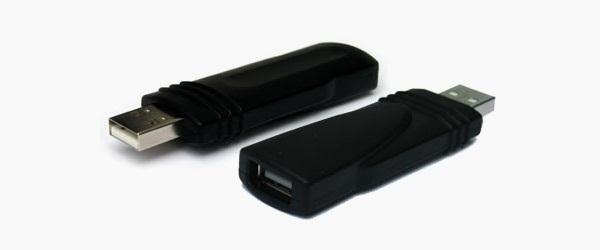
These work the same way as the software keylogger, except that a USB drive with the software needs to be connected to the victim's computer. The USB drive will save a summary of the keystrokes, so it's as simple as plugging it to your own computer and extracting the data. You can look through Keelog for prices, but it's bit higher than buying the software since you have the buy the USB drive with the program already on it.

How to Protect Yourself

  • Use a firewall. Keyloggers usually send information through the internet, so a firewall will monitor your computer's online activity and sniff out anything suspicious.
  • Install a password manager. Keyloggers can't steal what you don't type. Password mangers automatically fill out important forms without you having to type anything in.
  • Update your software. Once a company knows of any exploits in their software, they work on an update. Stay behind and you could be susceptible.
  • Change passwords. If you still don't feel protected, you can change your password bi-weekly. It may seem drastic, but it renders any information a hacker stole useless.

Method 3: Phishing

This option is much more difficult than the rest, but it is also the most common method to hack someone's account. The most popular type of phishing involves creating a fake login page. The page can be sent via email to your victim and will look exactly like the Facebook login page. If the victim logs in, the information will be sent to you instead of to Facebook. This process is difficult because you will need to create a web hosting account and a fake login page.
The easiest way to do this would be to follow our guide on how to clone a website to make an exact copy of the facebook login page. Then you'll just need to tweak the submit form to copy / store / email the login details a victim enters. If you need help with the exact steps, there are detailed instructions available by Alex Long here on Null Byte. Users are very careful now with logging into Facebook through other links, though, and email phishing filters are getting better every day, so that only adds to this already difficult process. But, it's still possible, especially if you clone the entire Facebook website.

How to Protect Yourself

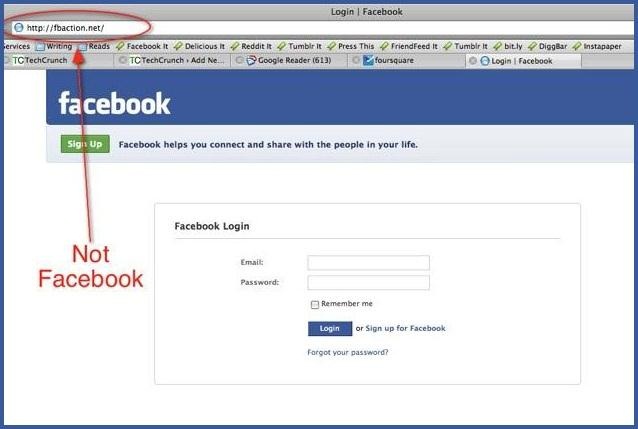
  • Don't click on links through email. If an email tells you to login to Facebook through a link, be wary. First check the URL (Here's a great guide on what to look out for). If you're still doubtful, go directly to the main website and login the way you usually do.
  • Phishing isn't only done through email. It can be any link on any website / chat room / text message / etc. Even ads that pop up can be malicious. Don't click on any sketchy looking links that ask for your information.
  • Use anti-virus & web security software, like Norton or McAfee.

Method 4: Stealing Cookies

Cookies allow a website to store information on a user's hard drive and later retrieve it. These cookies contain important information used to track a session that a hacker can sniff out and steal if they are on the same Wi-Fi network as the victim. They don't actually get the login passwords, but they can still access the victim's account by cloning the cookies, tricking Facebook into thinking the hacker's browser is already authenticated.
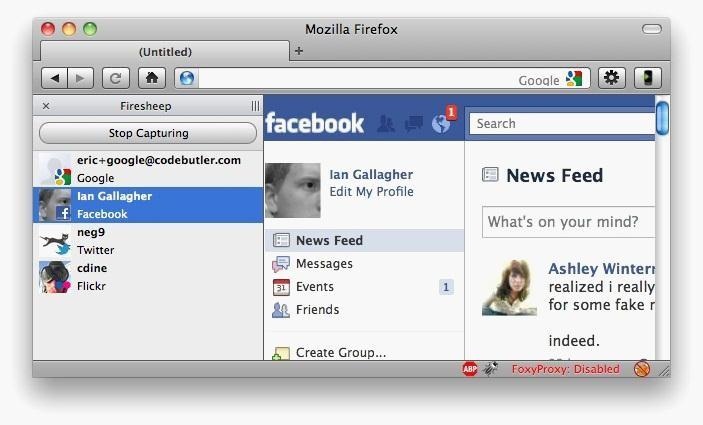
Firesheep is a Firefox add-on that sniffs web traffic on an open Wi-Fi connection. It collects the cookies and stores them in a tab on the side of the browser.
From there, the hacker can click on the saved cookies and access the victim's account, as long as the victim is still logged in. Once the victim logs out, it is impossible for the hacker to access the account.

How to Protect Yourself

  • On Facebook, go to your Account Settings and check under Security. Make sure Secure Browsing is enabled. Firesheep can't sniff out cookies over encrypted connections like HTTPS, so try to steer away from HTTP.
  • Full time SSL. Use Firefox add-ons such as HTTPS-Everywhere or Force-TLS.
  • Log off a website when you're done. Firesheep can't stay logged in to your account if you log off.
  • Use only trustworthy Wi-Fi networks. A hacker can be sitting across from you at Starbucks and looking through your email without you knowing it.
  • Use a VPN. These protect against any sidejacking from the same WiFi network, no matter what website you're on as all your network traffic will be encrypted all the way to your VPN provider.

Protecting Yourself: Less Is More

Social networking websites are great ways to stay connected with old friends and meet new people. Creating an event, sending a birthday greeting and telling your parents you love them are all a couple of clicks away.
Facebook isn't something you need to steer away from, but you do need to be aware of your surroundings and make smart decisions about what you put up on your profile. The less information you give out on Facebook for everyone to see, the more difficult you make it for hackers.
If your Facebook account ever gets hacked, check out our guide on getting your hacked Facebook account back for information on restoring your account.
Bonus: If you're interested in who's checking you out, there are some ways you can (kindof) track who's viewed your Facebook profile.
 

SQL INJECTION - INTRODUCTORY

SQL Injection

SQL injection is a technique used to take advantage of non-validated input vulnerabilities to pass SQL commands through a Web application for execution by a backend database. Attackers take advantage of the fact that programmers often chain together SQL commands with user-provided parameters, and can therefore embed SQL commands inside these parameters. The result is that the attacker can execute arbitrary SQL queries and/or commands on the backend database server through the Web application.

Details

Databases are fundamental components of Web applications. Databases enable Web applications to store data, preferences and content elements. Using SQL, Web applications interact with databases to dynamically build customized data views for each user. A common example is a Web application that manages products. In one of the Web application's dynamic pages (such as ASP), users are able to enter a product identifier and view the product name and description. The request sent to the database to retrieve the product's name and description is implemented by the following SQL statement.
SELECT ProductName, ProductDescription 
FROM Products 
WHERE ProductNumber = ProductNumber
Typically, Web applications use string queries, where the string contains both the query itself and its parameters. The string is built using server-side script languages such as ASP, JSP and CGI, and is then sent to the database server as a single SQL statement. The following example demonstrates an ASP code that generates a SQL query.
sql_query= "
SELECT ProductName, ProductDescription 
FROM Products 
WHERE ProductNumber = " & Request.QueryString("ProductID")
The call Request.QueryString("ProductID") extracts the value of the Web form variable ProductID so that it can be appended as the SELECT condition.
When a user enters the following URL:
http://www.mydomain.com/products/products.asp?productid=123
The corresponding SQL query is executed:
SELECT ProductName, ProductDescription 
FROM Products 
WHERE ProductNumber = 123
An attacker may abuse the fact that the ProductID parameter is passed to the database without sufficient validation. The attacker can manipulate the parameter's value to build malicious SQL statements. For example, setting the value "123 OR 1=1" to the ProductID variable results in the following URL:
http://www.mydomain.com/products/products.asp?productid=123 or 1=1
The corresponding SQL Statement is:
SELECT ProductName, Product Description
FROM Products
WHERE ProductNumber = 123 OR 1=1
This condition would always be true and all ProductName and ProductDescription pairs are returned. The attacker can manipulate the application even further by inserting malicious commands. For example, an attacker can request the following URL:
http://www.mydomain.com/products/products.asp?productid=123; DROP 
TABLE Products
In this example the semicolon is used to pass the database server multiple statements in a single execution. The second statement is "DROP TABLE Products" which causes SQL Server to delete the entire Products table.
An attacker may use SQL injection to retrieve data from other tables as well. This can be done using the SQL UNION SELECT statement. The UNION SELECT statement allows the chaining of two separate SQL SELECT queries that have nothing in common. For example, consider the following SQL query:
SELECT ProductName, ProductDescription 
FROM Products 
WHERE ProductID = '123' UNION SELECT Username, Password FROM Users;
The result of this query is a table with two columns, containing the results of the first and second queries, respectively. An attacker may use this type of SQL injection by requesting the following URL:
http://www.mydomain.com/products/products.asp?productid=123 UNION 
SELECT user-name, password FROM USERS
The security model used by many Web applications assumes that an SQL query is a trusted command. This enables attackers to exploit SQL queries to circumvent access controls, authentication and authorization checks. In some instances, SQL queries may allow access to host operating system level commands. This can be done using stored procedures. Stored procedures are SQL procedures usually bundled with the database server. For example, the extended stored procedure xp_cmdshell executes operating system commands in the context of a Microsoft SQL Server. Using the same example, the attacker can set the value of ProductID to be "123;EXEC master..xp_cmdshell dir--", which returns the list of files in the current directory of the SQL Server process.

Prevention

The most common way of detecting SQL injection attacks is by looking for SQL signatures in the incoming HTTP stream. For example, looking for SQL commands such as UNION, SELECT or xp_. The problem with this approach is the very high rate of false positives. Most SQL commands are legitimate words that could normally appear in the incoming HTTP stream. This will eventually case the user to either disable or ignore any SQL alert reported. In order to overcome this problem to some extent, the product must learn where it should and shouldn't expect SQL signatures to appear. The ability to discern parameter values from the entire HTTP request and the ability to handle various encoding scenarios are a must in this case.
Imperva SecureSphere does much more than that. It observes the SQL communication and builds a profile consisting of all allowed SQL queries. Whenever an SQL injection attack occurs, SecureSphere can detect the unauthorized query sent to the database. SecureSphere can also correlate anomalies on the SQL stream with anomalies on the HTTP stream to accurately detect SQL injection attacks.
Another important capability that SecureSphere introduces is the ability to monitor a user's activity over time and to correlate various anomalies generated by the same user. For example, the occurrence of a certain SQL signature in a parameter value might not be enough to alert for SQL injection attack but the same signature in correlation with error responses or abnormal parameter size of even other signatures may indicate that this is an attempt at SQL injection attack.
 

Spam & Phishing

Spam & Phishing

Cybercriminals have become quite savvy in their attempts to lure people in and get you to click on a link or open an attachment.

The email they send can look just like it comes from a financial institution, e-commerce site, government agency or any other service or business.

It often urges you to act quickly, because your account has been compromised, your order cannot be fulfilled or another matter.
If you are unsure whether an email request is legitimate, try to verify it with these steps:
  • Contact the company directly.
  • Contact the company using information provided on an account statement or back of a credit card.
  • Search for the company online – but not with information provided in the email.
Spam
Spam is the electronic equivalent of junk mail.  The term refers to unsolicited, bulk – and often unwanted – email. Here are ways to reduce spam:
  • Enable filters on your email programs: Most ISPs (Internet Service Providers) and email providers offer spam filters. However, depending on the level you set, you may wind up blocking emails you want. It’s a good idea to occasionally check your junk folder to ensure the filters are working properly.
  • Report spam: Most email clients offer ways to mark an email as spam or report instances of spam.  Reporting spam will also help to prevent the messages from being directly delivered to your inbox.
  • Own your online presence: Consider hiding your email address from online profiles and social networking sites or only allowing certain people to view your personal information.
Phishing
Phishing attacks use email or malicious websites (clicking on a link) to collect personal and financial information or infect your machine with malware and viruses.

Spear Phishing
Spear phishing is highly specialized attacks against a specific target or small group of targets to collect information of gain access to systems. For example, a cybercriminal may launch a spear phishing attack against a business to gain credentials to access a list of customers. From that attack, they may launch a phishing attack against the customers of the business. Since they have gained access to the network, the email they send may look even more authentic and because the recipient is already customer of the business, the email may more easily make it through filters and the recipient maybe more likely to open the email.
The cybercriminal can use even more devious social engineering efforts such as indicating there is an important technical update or new lower pricing to lure people.

Spam & Phishing on Social Networks
Spam, phishing and other scams aren’t limited to just email. They’re also prevalent on social networking sites. The same rules apply on social networks: When in doubt, throw it out. This rule applies to links in online ads, status updates, tweets and other posts. Here are ways to report spam and phishing on social networks:
How Do You Avoid Being a Victim?
  • Don’t reveal personal or financial information in an email, and do not respond to email solicitations for this information. This includes following links sent in email.
  • Before sending sensitive information over the Internet, check the security of the website.
  • Pay attention to the website's URL. Malicious websites may look identical to a legitimate site, but the URL may use a variation in spelling or a different domain (e.g., .com versus .net).
  • Keep a clean machine. Having the latest operating system, software, web browsers, anti-virus protection and apps are the best defenses against viruses, malware, and other online threats.
What to Do if You Think You are a Victim?
  • Report it to the appropriate people within the organization, including network administrators. They can be alert for any suspicious or unusual activity.
  • If you believe your financial accounts may be compromised, contact your financial institution immediately and close the account(s).
  • Watch for any unauthorized charges to your account.
Additional Resources:


Protect Yourself with these STOP. THINK. CONNECT. Tips:
  • When in doubt, throw it out: Links in email, tweets, posts, and online advertising are often the way cybercriminals compromise your computer. If it looks suspicious, even if you know the source, it’s best to delete or if appropriate, mark as junk email.
  • Think before you act: Be wary of communications that implores you to act immediately, offers something that sounds too good to be true, or asks for personal information.
  • Secure your accounts: Ask for protection beyond passwords. Many account providers now offer additional ways for you verify who you are before you conduct business on that site.
  • Make passwords long and strong: Combine capital and lowercase letters with numbers and symbols to create a more secure password.
  • Unique account, unique password: Separate passwords for every account helps to thwart cybercriminals
  • source:SSO